


The best ways to automate sales outreach start with five moves: speed-to-lead response, contact enrichment, multichannel sequences with hard exit rules, intent-based routing, and AI-assisted personalization, all backed by auto-logging so nothing gets lost. Validate the manual version of each motion for 30 days, pilot one narrowly, measure adoption and reply lift, then scale. Done right, reps get back significant time each week and meeting conversion often improves substantially within the first quarter.
TL;DR:
- Automate speed-to-lead response within minutes and use intent signals such as funding and website visits to prioritize contacts effectively.
- Use multichannel sequences with clear exit rules to avoid over-saturation and maintain relationship integrity, integrating email, LinkedIn, and calls based on buyer behavior.
- Validate and document manual sales processes for 30 days before automation to prevent scaling broken workflows and ensure reliable data hygiene.
- Focus on core KPIs such as response time, reply rate, and meeting conversion to measure automation success, keeping hygiene metrics above 90 percent.
- Assign clear ownership for each tool category, eliminate overlaps, and avoid over-automation on sensitive accounts to prevent failure and maintain sales quality.
Table of Contents
- What to Automate First: A Prioritized Checklist
- How Do You Build an Automated Outreach Sequence That Actually Works?
- Which Tools Handle Which Job in the Outreach Stack?
- How Do You Roll Out Automation Without Breaking What Already Works?
- Which KPIs Actually Prove Automation Is Working?
- What Goes Wrong With Sales Automation, and How Do You Prevent It?
- How Should Consultative Sellers Apply These Methods Without Losing the Relationship?
- Editorial Take: Where the Automation Hype Gets It Backward
- Get a Pilot Designed and Run for You
- Sources
What to Automate First: A Prioritized Checklist
Not every task deserves automation on day one, and treating them equally is how pilots stall. Rank candidates by friction times frequency times revenue impact, then subtract buyer risk. A task a rep does 40 times a day, hates doing, and rarely gets wrong is a much better candidate than a rare, high-stakes judgment call.
Speed-to-lead sits at the top of almost every list for a reason. When a lead fills out a form, the gap between submission and first contact is the single largest predictor of whether that lead ever books a meeting. Automating the acknowledgment, the routing to the right rep, and the calendar link removes the slowest, most error-prone step in the funnel.
Contact enrichment follows close behind. Reps waste real time manually searching for a title, a company size, or a recent funding round before they can even personalize an opener. An enrichment tool that fires automatically the moment a lead enters the CRM hands that context to the rep before they’ve finished their coffee.
A short list of where to start:
- Speed-to-lead response: auto-acknowledge and route inbound leads to the right rep within minutes, not hours.
- Contact and account enrichment: pull firmographic and technographic data automatically instead of manual research.
- Auto-logging: capture call notes, email threads, and meeting outcomes in the CRM without manual entry.
- Follow-up reminders: trigger nudges when a deal has gone quiet past a set threshold, rather than relying on memory.
Before any of this goes live, run the process by hand for 30 days. Document every step a human currently takes, note where it breaks, and fix the underlying data before you document the manual sales motion and validate it with automation layered on top. Automating a broken process just breaks it faster and at greater scale.
Pro Tip: Pick the automation your reps already complain about the most. Adoption is far easier to win when you’re removing a task people actively resent, not one they’ve quietly built a workaround for.
How Do You Build an Automated Outreach Sequence That Actually Works?
A sequence is only as good as its channel mix, its timing, and its exit conditions. Get any one of those wrong and you end up with either silence or a spam complaint.
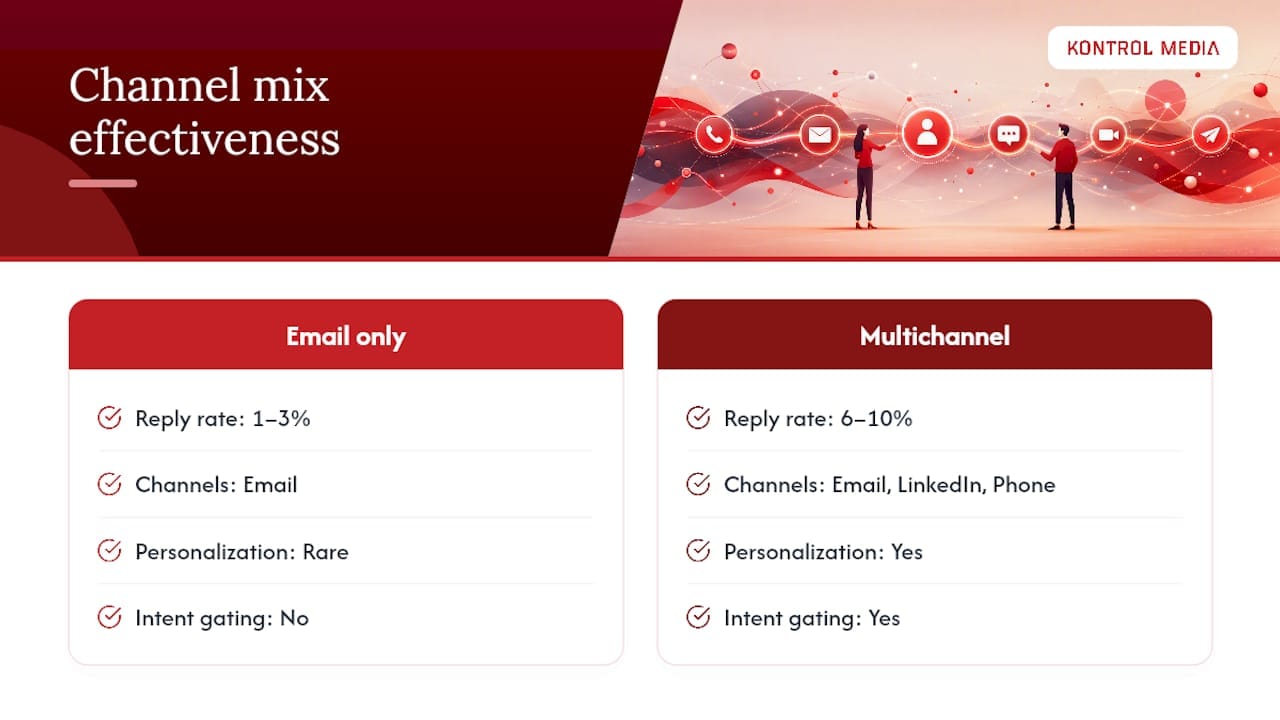
1. Design the channel mix around how your buyer actually pays attention. Email alone typically produces reply rates in the 1 to 3 percent range. Layer in LinkedIn touches and a phone call, and multichannel sequences often lift replies to 6 to 10 percent when the messaging is personalized and gated by intent signals rather than blasted uniformly. The extra channels aren’t about volume. They’re about meeting the buyer where they’re most likely to notice you that week.
2. Set the sequence length and cadence before you write a single email. The current best-practice pattern runs multiple touches spread across several weeks, mixing email, a LinkedIn connection or comment, calls, and occasionally a short video message. Front-load the sequence with lighter touches and save the more direct asks for the middle stretch, once the prospect has seen your name two or three times.
3. Build exit rules into the sequence from the start, not as an afterthought. Every contact should automatically drop out of a sequence the moment they reply, book a meeting, opt out, or bounce. Sequences that keep running after a reply are the fastest way to torch a relationship and, at scale, your domain’s sending reputation.
4. Use intent signals to decide who gets touched at all. Funding announcements, hiring surges in a relevant department, product launches, and repeat visits to a pricing page are the four signals worth building routing rules around. A lead who just visited your pricing page twice in a week deserves a different sequence and a faster human follow-up than one who downloaded a whitepaper eight months ago and went quiet.
5. Use AI for the first line, not the whole message. Large language models are genuinely good at drafting a personalized opener from a LinkedIn bio or a recent press mention, and at compiling a one-page account brief before a call. They’re much less reliable at judging tone for a sensitive account or a renewal conversation gone sideways. Keep a human review gate on anything going to a strategic account or anything triggered by a negative signal.
6. Auto-classify replies so reps triage in seconds, not minutes. A reply-sorting rule that buckets incoming responses into book, objection, nurture, or unsubscribe saves a rep from rereading a thread to figure out what happens next. It also means objections get routed to whoever handles them best, instead of sitting in a generic inbox.
7. Automate scheduling, but keep the reminder sequence human-feeling. A calendar link removes the back-and-forth of finding a time. A reminder sequence the day before and the morning of a call cuts no-shows meaningfully, as long as the copy still reads like a person wrote it.
AI-driven personalization paired with intent routing is now the largest single productivity lever in outbound, often doubling or tripling reply rates without any increase in send volume, provided the underlying contact list is clean. That last condition matters more than most teams admit. AI personalization applied to a stale or mismatched list just produces faster, more confident nonsense.
Which Tools Handle Which Job in the Outreach Stack?
The outreach tech stack has sprawled into a dozen overlapping categories, and most of the failed rollouts I’ve seen didn’t fail because the tools were bad. They failed because three tools were doing the same job and nobody owned the decision of which one to keep.
Here’s how the categories actually break down by function:
- Engagement and sequencing platforms: build and run the multichannel cadences, track opens and replies, and enforce exit rules automatically.
- Enrichment and data providers: append firmographic, technographic, and contact-level detail the moment a lead enters the system.
- Intent platforms: monitor buying signals across the web and flag accounts showing active research behavior.
- Conversation intelligence tools: record and analyze calls to surface objections, competitor mentions, and coaching moments.
- CRM automation layers: handle logging, task creation, and pipeline stage updates without manual data entry.
- Calendar and meeting tools: remove scheduling friction and automate reminder sequences.
- AI assistants: draft first-line personalization, summarize accounts, and increasingly act on tasks like enrichment and routing rather than just suggesting them.
When evaluating any tool in these categories, four criteria matter more than the feature list on the sales page: native CRM sync (not a clunky third-party connector), how deep the integration actually reaches into your workflow, how fresh the underlying data is, and whether admin controls let you govern who can build or edit sequences. Pricing model matters too, since per-seat pricing punishes growth in a way flat platform fees don’t.
The rule worth enforcing across the whole stack is simple: one job, one tool. If your engagement platform and your CRM automation layer both claim to handle follow-up reminders, pick one and decommission the other. Require native integration as a baseline for any new purchase, and set a decommission trigger up front. If a tool sits unused by more than half the team for 60 days, it’s gone. AI Workers that act on tasks like enrichment and routing, rather than only suggesting next steps, tend to produce better operational outcomes for revenue teams than assistants that just generate advice nobody has time to act on.
How Do You Roll Out Automation Without Breaking What Already Works?
Skipping straight to a full rollout is the single most common mistake I see teams make, and it’s almost always the reason a promising pilot gets quietly abandoned three months in.
1. Preflight: document before you automate. Write down the current manual sales motion step by step, even the parts that feel obvious. Define your ideal customer profile clearly enough that a new hire could recognize a good-fit lead without help, and set the specific metrics that will define success before you touch a single tool. Clean your contact data now. Duplicate records and dead fields will quietly sabotage enrichment and routing later.

2. Pilot: pick one workflow and one owner. Resist the urge to automate speed-to-lead, enrichment, and sequencing all at once. Choose the single workflow with the clearest friction point, assign one named owner who’s accountable for it, and set a firm timeline, typically 30 days. Build a short training session and a coaching plan so reps understand why the automation exists, not just how to click through it.
3. Measure: track adoption and conversion weekly, not monthly. Watch how many reps are actually using the new workflow versus working around it, and track reply rate and meeting conversion against your pre-pilot baseline. A reasonable pilot target is under five minutes to first touch on inbound leads and a 15 percent or greater lift in meeting conversion, a benchmark drawn from real pilot patterns rather than a guess. If adoption is under 60 percent by week three, that’s a signal to fix training or incentives before scaling anything.
4. Scale: standardize, govern, and reinvest. Once the pilot clears its go or no-go threshold, turn the workflow into a documented playbook the rest of the team can follow. Name a RevOps owner accountable for the whole automation stack going forward, run a monthly audit to catch tool overlap early, and reinvest the hours reps get back into the parts of selling that still require a human, like discovery calls and negotiation.
Pro Tip: Set your go or no-go thresholds in writing before the pilot starts. Deciding what “good enough” looks like after you’ve already seen the numbers is how teams talk themselves into scaling something mediocre.
Which KPIs Actually Prove Automation Is Working?
Activity metrics feel good to report and mean almost nothing on their own. The KPIs that actually connect automation to revenue split into two groups: conversion metrics and operational hygiene metrics.
On the conversion side, track speed to first touch, reply rate, meeting conversion rate, pipeline generated, and closed-won revenue influenced by the automated motion. On the hygiene side, track enrichment completion rate, auto-logging rate, how often sequences exit automatically on a genuine trigger versus running their full length unanswered, and your opt-out or spam flag rate.
| Metric | Cadence | Target signal |
|---|---|---|
| Speed to first touch | Weekly | Under 5 minutes on inbound leads |
| Reply rate | Weekly | Meaningful lift over pre-automation baseline |
| Meeting conversion | Weekly | 15%+ lift over baseline |
| Enrichment completion rate | Monthly | Consistently above 90% |
| Auto-logging rate | Monthly | Consistently above 90% |
| Opt-outs / spam flags | Weekly | Flat or declining |
Speed-to-lead, reply rate, meeting conversion, and reclaimed selling time are the KPI mix operator guides consistently point to when tying automation back to revenue rather than raw activity. A simple weekly dashboard covering the top three rows, reviewed alongside a monthly rollup of the hygiene metrics, gives leadership a clear read on whether the automation is earning its keep.
What Goes Wrong With Sales Automation, and How Do You Prevent It?
Most automation failures trace back to one of four patterns, and all four are preventable if you catch them early.
- Tool sprawl: freeze new purchases, map every overlapping capability across the stack, and assign a named owner to each remaining tool.
- Sequence fatigue and domain risk: enforce exit on reply, cap weekly touches per contact, and apply a cooling period after any negative reply before that contact can enter another sequence.
- Over-automation on sensitive accounts: require human review before any automated message goes to a strategic account or follows a negative signal.
- Data hygiene decay: schedule enrichment refreshes, run deduplication regularly, and cut mandatory CRM fields down to what reps will actually fill in consistently.
The fix for most of these isn’t more technology. It’s fewer tools, clearer ownership, and freezing purchases while you audit the existing stack and clean the data layer before adding anything new. Cooling periods, intent-based branching, and human-in-the-loop approval for sensitive messages are the specific guardrails worth building into any sequence platform from day one, rather than bolting them on after a prospect complains.
Pro Tip: If you can’t name who owns a tool in your stack right now, off the top of your head, that’s the first one to audit for overlap or removal.
How Should Consultative Sellers Apply These Methods Without Losing the Relationship?
Consultative and high-touch sales models can absolutely use everything above, but the line between what to automate and what to protect sits in a different place than it does for high-volume transactional selling.
Speed-to-lead and account brief generation are safe to automate almost everywhere. A prospective client researching a consulting engagement still wants a fast, informed first response, and an AI-generated account brief pulling in company news, funding stage, and recent leadership changes saves real prep time before a discovery call. What shouldn’t be automated is the discovery conversation itself, or the negotiation that follows it. Those moments are where a consultative seller earns trust, and a templated message or an AI-drafted counterproposal reads as exactly what it is.
Assign clear operational roles before scaling anything: a RevOps owner accountable for the stack, an adoption champion on the sales team who models the workflow for peers, and an executive sponsor who signs off on which accounts get the human-only treatment. Building a high-performing sales team around this split, rather than assuming automation replaces relationship work, is what separates a pilot that scales from one that quietly dies in month two.
Editorial Take: Where the Automation Hype Gets It Backward
Most advice on this topic treats automation as a volume play: send more, touch more, sequence more. The research behind this article points somewhere else entirely. The teams getting real lift aren’t sending more messages. They’re sending fewer, better-targeted ones, gated by intent signals, and reinvesting the hours saved into the parts of selling a machine still can’t do.
Conventional wisdom also underrates how much of automation’s failure rate traces back to process, not technology. A tool rarely breaks a sales motion. A broken sales motion, automated and scaled, breaks itself faster.
If I had to tell a founder or sales leader what to prioritize first, it wouldn’t be a tool purchase. It would be spending two weeks documenting exactly how leads move through the funnel today, warts and all, before automating a single step of it. Speed-to-lead is the one motion I’d trust to automate almost immediately for nearly any business. Everything involving judgment, negotiation, or a strategic account deserves a human checkpoint, no matter how good the AI draft looks.
— Mark Kapczynski
Get a Pilot Designed and Run for You
Kontrol Media builds the pilot, runs it, and hands you the playbook, which means you skip the months most teams spend picking tools and guessing at thresholds. We design the narrow workflow, set the go or no-go metrics before day one, and manage the execution ourselves rather than leaving your team to figure out adoption on their own.
That’s the practical difference between reading a framework and having someone run it with you: a defined 30 to 90 day scope, a named owner on our side, and measurement built in from the start instead of bolted on after the fact. If your team is weighing whether to build this in house or bring in outside execution, our business strategy consulting services are built for exactly this kind of pilot to scale work. Get in touch and we’ll map out what a 30 day pilot would look like for your current sales motion.
Sources
- Top Sales Automation Pitfalls and How to Avoid Them
- Why Sales Automation Fails in 2026 (and How to Fix It)
- Outbound Sales Sequencing: The Complete 2026 Cadence Framework | Nimitai
Recommended
- Building a High-Performing Sales Team: Strategies and Best Practices | Kontrol Media Consultancy
- Your Sales Function, Without the Headcount | Kontrol Media Consultancy
- Everyone Sells: How Every Role Drives Trust and Revenue | Kontrol Media Consultancy
- Align Marketing and Sales to Hit Revenue Goals | Kontrol Media Consultancy